|
1
|
- Presented by:
- Amy Lynn Maroso, Visiting Assistant Professor
- Illinois Digitization Institute, University Library
- University of Illinois at Urbana-Champaign
- DLF Fall Forum – 26 October 2004
|
|
2
|
- Funded by a National Leadership Grant through the Institute of Museum
and Library Services
- “Basics and Beyond” digitization training program
- Provides three levels of digitization training throughout Illinois and
around the world via
workshops and on-line courses
|
|
3
|
|
|
4
|
- Training needs do exist – especially for small/medium institutions
- Training needs differ (price, level of training, time commitment)
- IDI offers three options to meet training needs
- Track 1 workshops
- Track 2 on-line courses
- Track 3 “on-line plus” courses
|
|
5
|
- One day workshops – each given in a different location in Illinois
- Basic instruction on digitization fundamentals
- Advantages/disadvantages of digitization
- How to plan a successful project
- What digital images are made of
- Buying appropriate equipment
- Professional standards for digital projects
- What metadata is and why it’s important
- Making use of the Illinois State Library’s Illinois Digital Archives
(IDA)
|
|
6
|
- Mix of libraries, archives, museums, historical societies
- Cost: $45.00
- Over 200 people have taken the workshops (11 given; 3 to go)
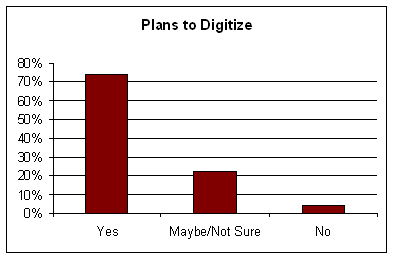
- Nearly all have ideas for projects but…
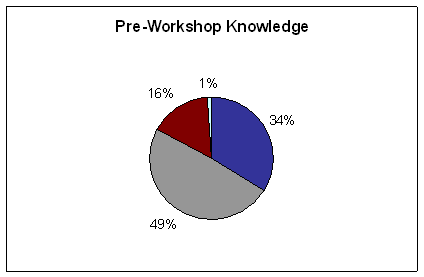
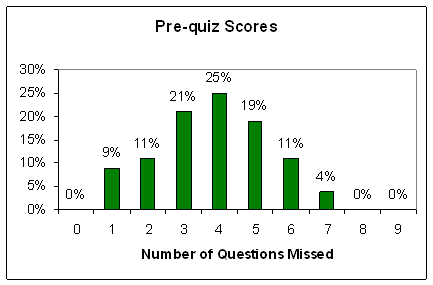
- Most have no or very little experience with digitization projects
(here’s proof)…
|
|
7
|
|
|
8
|
|
|
9
|
|
|
10
|
|
|
11
|
- “How much will this cost?”
- “How will I get my images on the Internet?”
- “What scanner should I buy?”
- “What resolution is best for my images?”
- “How should I store my images?”
- “Is there a method for selecting materials?”
- “What is metadata?”
|
|
12
|
- “The most useful thing I learned was how to store our info. (which CDs,
TIFFs vs. JPEGs, etc.) because we’ve been doing it all wrong!”
- “The large amount of detail really cleared up many questions for me.”
- Participants mention the usefulness of information about project
planning, what digital images are made of, and what metadata is, and how
to choose equipment.
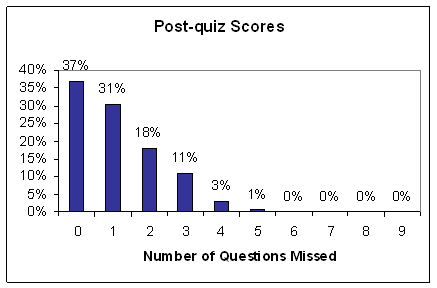
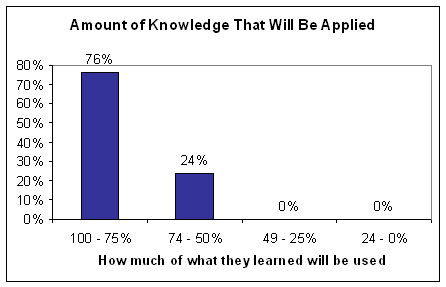
- 88% say they will use all of what they learned in the workshop for
future projects
|
|
13
|
- Three week, asynchronous, on-line course
- Web-based advanced digitization training
- Benefits and costs of projects
- Issues involved in designing and setting goals
- Selecting materials to digitize
- Evaluation and selection of equipment
- Creating good digital images
- Metadata standards and creation
- Storage and delivery of images
|
|
14
|
- First time this type of training has been done
- Instructor-lead but still asynchronous
- Students required to submit assignments
- Deadlines on assignments and readings
- All students receive instructor feedback
- Class bulletin board encourages interaction between students and with
instructor
- One live chat session per course
|
|
15
|
|
|
16
|
|
|
17
|
- Universities, large state historical societies, small local museums,
state archives, two-person archives, international locations
- 84 people have taken the course (7 given)
- 98% already own equipment
- 80% are ready to start planning or have already started a project
- Nearly 40% want to digitize 1,000 or more items
|
|
18
|
|
|
19
|
- “What kind of image management database would be best for my project?”
- “What do we need to know to keep this collection viable in the future?”
- “How can we keep costs down?”
- “How can I get everyone I’m collaborating with to agree on anything?”
- “I’m really worried that putting my images on the web will overwhelm my
small, overworked staff with reference requests.”
|
|
20
|
- 90% strongly agree that “The course helped me learn skills and
techniques that will be directly applicable to any of my future
digitization projects.”
- 88% strongly agree that “The course content and assignments helped me
learn more about digitization than I would have learned on my own.”
- Over 80% have accessed the course web site after the course ended.
|
|
21
|
- “The earlier readings on planning (especially those concerning copyright
& prices) were eye-opening.”
- “This course was so important to my project. I feel like I know 300% more than I
did when I started it.”
- Repeatedly mentioned: project planning, metadata, shopping assignment,
Photoshop, talking to other people involved in projects
|
|
22
|
- Created for those who want to “take it to the next level”
- Three week on-line course PLUS 2 days of hands-on training at UIUC
- Learn the hands-on process from start to finish during workshop
- Use scanners, cameras, software, and create metadata
- Create a mini-collection
|
|
23
|
- Presentation on the preservation perspective
- Presentation on OAI
- Demonstration of planetary scanner
- Find the smallest significant character for the Cornell QI method
- Hands-on work using digital camera, flatbed scanners, large-format
scanner, slide scanner
- Learn techniques in Photoshop Elements
- Create metadata for images and up loading to CONTENTdm database
|
|
24
|
- Universities, colleges, larger historical societies, and museums
- However, also participants from different institutions (Alzheimer’s
Association, National Association of Realtors, companies)
- Many starting (or being forced to start) digitization projects or
already have one in progress
- 25 people have participated in the Track 3 courses (2 given)
|
|
25
|
|
|
26
|
- “It was helpful to learn about CONTENTdm as an example; how the larger
community of librarians…think about metadata.”
- “Photoshop Elements is not scary but actually fun and versatile to work
with.”
- Photoshop, preservation & OAI presentations, and seeing the “back
end” of CONTENTdm were mentioned as most useful
- Were excited to talk to/meet other digitizers
|
|
27
|
- Work with the Illinois State Library to provide LSTA “Boot Camp”
- Given to all recipients of LSTA grants for digitization
- Topics:
- Workflow and timeline considerations
- Standard and best practices for scanning
- Hands-on scanning work
- Hands-on Photoshop tutorial
|
|
28
|
|

 Notes
Notes